
.png&w=1920&q=75)



Moving Beyond Dynamics GP: Find Efficient and Affordable Solutions
As Microsoft phases out support for Microsoft Dynamics Great Plains (GP), we can help you move forward, whether you want to enhance your GP system, improve productivity and security by migrating to the cloud, or explore a new cloud-based ERP solution like Microsoft Dynamics 365 Business Central.
You’re exploring this because you’re considering transitioning from Microsoft Dynamics GP to a new solution.

Is it time to evolve your ERP?

Is It Time to Evolve Your ERP?
Transitioning from Dynamics GP to Business Central could be the ideal choice for your organization if you aim to:
- Transition your systems to the cloud
- Reduce costs associated with server maintenance and upgrade
- Boost productivity and collaboration for remote as well as mobile workforce
- Benefit from advanced security as well as disaster recovery competencies, with data stored in secure Microsoft-managed data centers
- Stay updated with the newest ERP version, removing the necessity for future upgrades
- Get smooth integrations with other Microsoft products, such as invoicing via Outlook as well as process automation with Power Automate
- Get predictable and adaptable ERP costs with monthly user-based licenses
What Makes Moving on from GP Essential?
- Transition to a cloud-based solution to lower total cost of ownership (TCO)
- Significantly reduce your infrastructure costs
- Access new, modern features like automatic workflows, out-of-the-box and intuitive dashboards, and automatic updates
- Leverage the Azure platform with low-code/no-code capabilities for rapid app customization and integration
- Enhance data security and ensure compliance with advanced protection
Read our Blog:
Next Steps for Transitioning from Microsoft Dynamics GP
When you’re ready to shift from your existing version of Dynamics GP, you have several options including:
Upgrade to Business Central
Advance your business with Dynamics 365 Business Centra designed for the cloud, offering efficiency, accessibility, and security to ensure your success.

Migrate GP to a Cloud Solution
Ensure the security of your GP data while driving profitability and increasing productivity with our cutting-edge solutions powered by Azure.

Maximize Your GP System Efficiency
Unlock the full potential of your ERP with unparalleled services, support, and insights.

Begin with a No-Cost ERP Modernization Assessment
Gain insights into your current status and a strategy for how your Dynamics GP technology can guide your business toward its future goals. Use our quick and simple assessment with our ERP experts:
- Assess the existing state of your Microsoft Dynamics GP
- Create a technology strategy for your present and future requirements
- Detect possible challenges and assess process improvements before they escalate into risks
- Improve your technology to support your business growth

Getting Ready for Tomorrow with Dynamics 365 Business Central
As software becomes outdated and nears its end-of-support, it tends to become less consistent and difficult to manage, raising the risk of operational interruptions. Finding affordable support for legacy systems can be tough, which can hinder your competitiveness compared to businesses using an advanced ERP solution.
Korcomptenz has in-depth experience in migrating from Microsoft GP to Dynamics 365 Business Central, having managed this transition successfully for several of our clients. We know about the technical capabilities as well as features of both platforms.
Lessen interruptions to your business by allowing us to design and implement a smooth migration plan that updates your ERP system while protecting your data.
Reasons to Transition to Dynamics 365 Business Central
Increased Functionality
Leverage advanced analytics, AI and, ML for deeper insights and improved operational efficiency.
More Scalability
As a cloud-enabled solution, it supports future growth without requiring significant infrastructure costs.
Smooth Integration
Integrates effortlessly with other Microsoft products like Azure, Power and Office 365 for a unified and positive work environment.
Regular Updates
Get constant updates from Microsoft to keep your software up-to-date with modern technology and security improvements.
Key Steps for Moving from Dynamics GP to Business Central
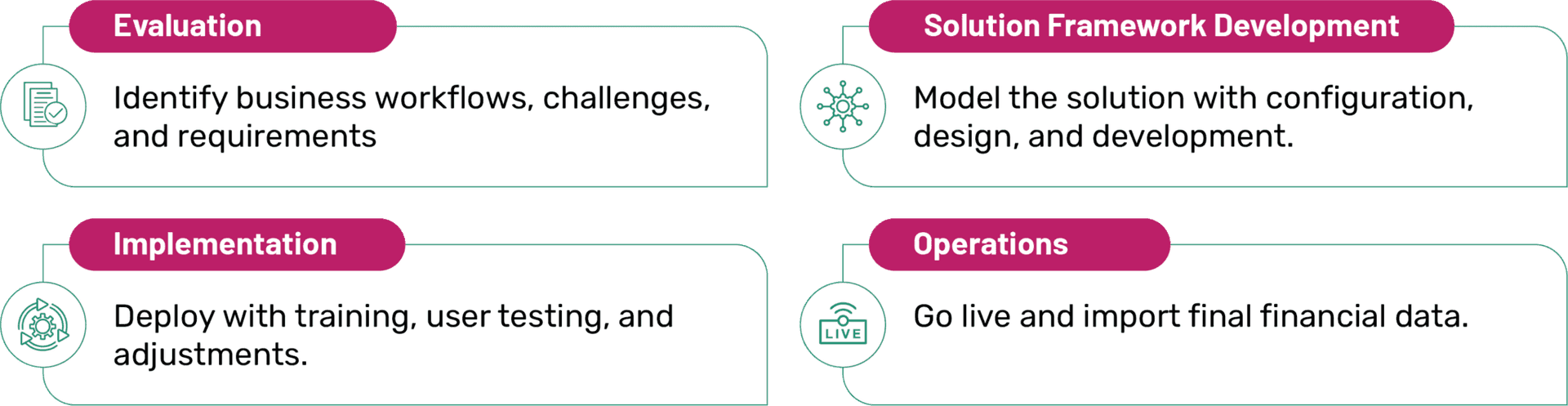
Essential Preparations for a Smooth Transition to Dynamics 365 BC

Record Your Processes
This may uncover shortcomings in your current processes, aiding in defining the strategic purpose of your project.

Identify Areas of Concern
Which problem areas in your processes tend to repeat? Are there any manual procedures that could be streamlined through.

Analyze Your Data
Archive inactive records, consolidate duplicates, and ensure subledgers reconcile with the general ledger.

Create a List of Best Features
Are there specific features in Business Central or additional Microsoft solutions you'd like to examine?
Why Korcomptenz for Your Microsoft GP to Dynamics 365 Business Central Migration?


All about Microsoft
Dynamics 365 Business Central
Dynamics NAV to BC Migration
Dynamics SL to Business Central Migration
Dynamics Business Central Customization
Business Central Support Services
MS Dynamics 365 Implementation Service
Microsoft Dynamics 365 Consulting
Dynamics 365 Assessment and Modernization
Microsoft Dynamics 365 Support Services
